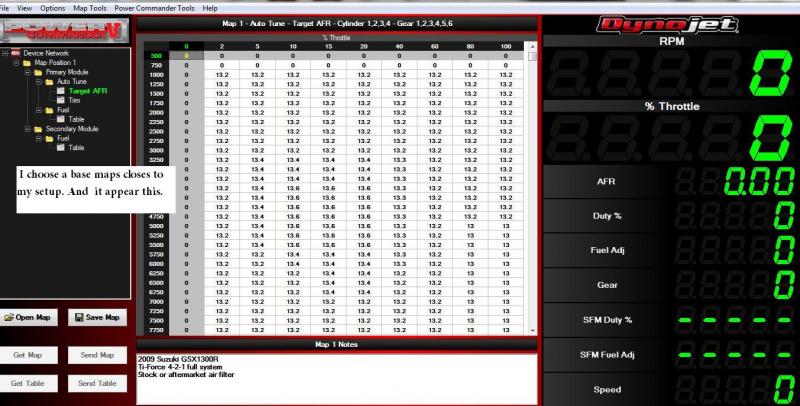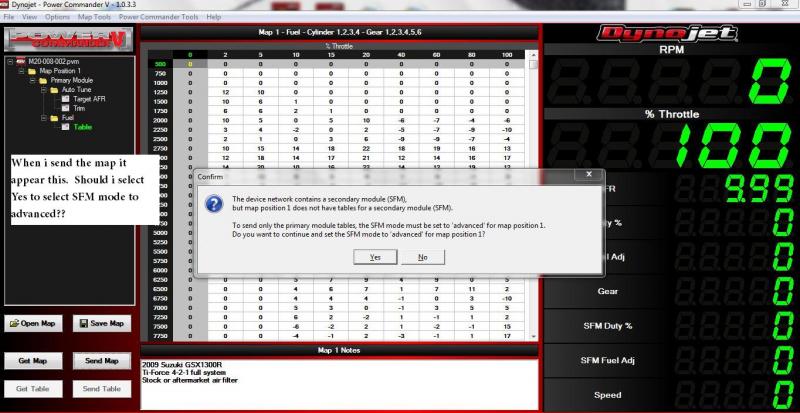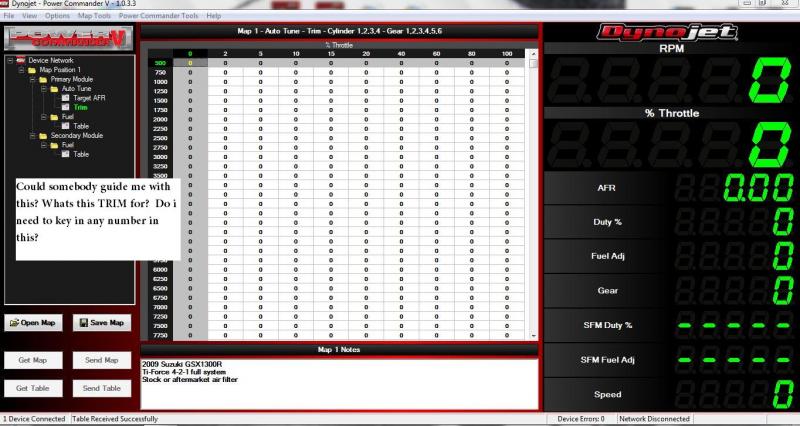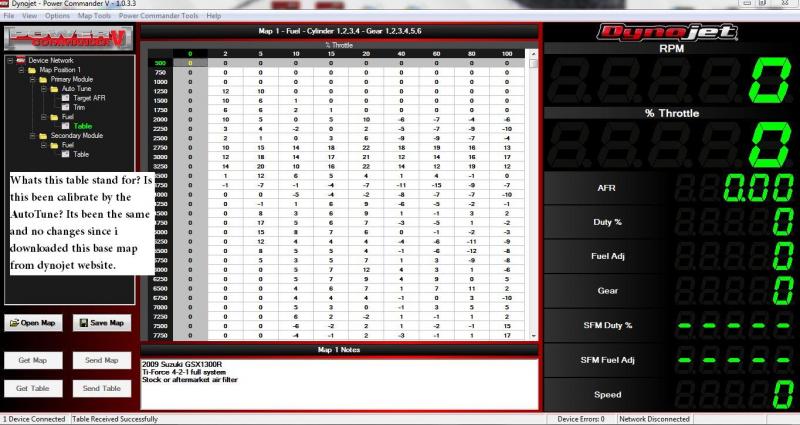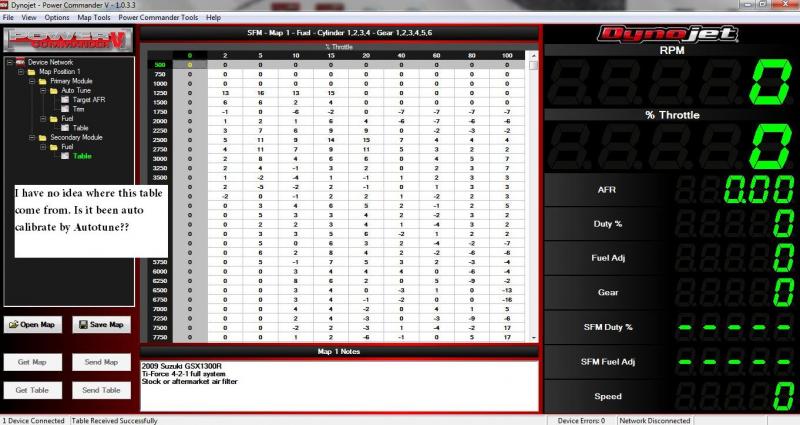

Can someone pls guide me on my Autotune. ( Photo attach)

nitezpeed

Registered
Joined
Apr 19, 2009
Messages
74
Reaction score
0
I have a set of PCV, SFM and AUTOTUNE install by myself. Somehow i dont seem to really understand what the instruction manual teaches. Can someone please guide me or teaches me to use my AutoTune. :please::bowdown:

THANKS A Million guys:please::bowdown::bowdown::bowdown:

Capture1A.jpg


Capture1B.jpg


Capture2.jpg


Capture3.jpg


Capture4.jpg


Capture10.jpg

fadiizzaldin

Registered
Joined
Feb 5, 2008
Messages
261
Reaction score
9
ok ...
- Table is for you fuel numbers i.e. 10 mean 10% more fuel -10 mean -10% fuel.
- trim is the value you get from auto tune after riding (recomemded change in fuel tables)
- Target air/fuel ratio is the value that autotune will try to match in generating new trims for your base table(map)

PCV 1 controls the lower injecters, the SFM controls the upper injectors so each one (i suppouse) needs a table of fuel adjustments (I dont have SFM, so maybe someone who worked on them could chip in)

outlawbusa

1 wheel up aero testing
Donating Member
Joined
May 22, 2009
Messages
6,163
Reaction score
72
ok ...
- - trim is the value you get from auto tune after riding (recomemded change in fuel tables)

Also, the trim table provides a number that you can accept into your current map...once you do this it resets the trim table to 0 and will make further adjustments.

Be careful on the lower throttle position (2%, 5%), you'll see a lot of fuel dumped in here after deacceleration~!~

I actually turned everything off under 10% by inputting 0 into the trim table to prevent this from happening, this will keep the current map numbers for that column.

nitezpeed

Registered
Joined
Apr 19, 2009
Messages
74
Reaction score
0
ok ...
- Table is for you fuel numbers i.e. 10 mean 10% more fuel -10 mean -10% fuel.
- trim is the value you get from auto tune after riding (recomemded change in fuel tables)
- Target air/fuel ratio is the value that autotune will try to match in generating new trims for your base table(map)

PCV 1 controls the lower injecters, the SFM controls the upper injectors so each one (i suppouse) needs a table of fuel adjustments (I dont have SFM, so maybe someone who worked on them could chip in)

HI Fadiizzaldin. Thanks alot for teaching.:thumbsup:
May i ask some question. Trim is the valve i will get from auto tune after my riding. But everytime after my ride i plug in and see all 0 in the Trim table. There is no other number or any figure at all. Is it normal?

Thanks you so much..:thumbsup::bowdown::cheerleader:

nitezpeed

Registered
Joined
Apr 19, 2009
Messages
74
Reaction score
0
Also, the trim table provides a number that you can accept into your current map...once you do this it resets the trim table to 0 and will make further adjustments.

Be careful on the lower throttle position (2%, 5%), you'll see a lot of fuel dumped in here after deacceleration~!~

I actually turned everything off under 10% by inputting 0 into the trim table to prevent this from happening, this will keep the current map numbers for that column.

Thanks Outlawbusa.:thumbsup:

Were u saying that under the TABLE.. 2% and 5% column all will input 0 to prevent fuel dumped after deacceleration.

Will take note of it.. Thanks

Somehow i think the SFM is not working well with the PCV and Auto tune. And in the TRIM i dont see any changes but all 0.. Was wondering is it something i miss out? Got to check agian..

Really Thanks alot Outlawbusa..:thumbsup::bowdown::cheerleader:

outlawbusa

1 wheel up aero testing
Donating Member
Joined
May 22, 2009
Messages
6,163
Reaction score
72
Dynojet Power Commander Auto-Tune Tuned!

Outlawbusa. This is what u mean in this link??

Actually yes, that's exactly what I am talking about...however I would put 0 all the way down the column because if you think about it you'll never use 2% or 5% throttle at 8000 RPM's while accelerating, that would only be deacceleration. Glad someone else had a similar idea~!~

Also, you said your trim is showing 0's
Check you plug. Make sure you put in the plastic plug with the jumper and not the rubber plug. This is a commonly missed piece and is not covered in the directions.

nitezpeed

Registered
Joined
Apr 19, 2009
Messages
74
Reaction score
0
Outlawbusa. Cool!! I learn something new.. I will check my plug tml morning.. Outlawbusa. Did u notice that my Throttle % is 100.. Is it normal too? So headache with this PCV and AutoTune. Guess i going to remove the SFM first.. Very complicated..???

Thanks Outlawbusa:thumbsup::bowdown::cheerleader:

outlawbusa

1 wheel up aero testing
Donating Member
Joined
May 22, 2009
Messages
6,163
Reaction score
72
Throttle % should not read 100% if closed. Never seen that one before...doubt if this would be the problem, but there is a throttle % calibration mode on there. It might be in the LCD display unit though, I can't remember right off.

nitezpeed

Registered
Joined
Apr 19, 2009
Messages
74
Reaction score
0
Throttle % should not read 100% if closed. Never seen that one before...doubt if this would be the problem, but there is a throttle % calibration mode on there. It might be in the LCD display unit though, I can't remember right off.

For the Throttle % i have finally solve it.. First i unplug red plug from TPS and plug on the same wire but 1cm away. Then i start the software from my latop and it appear jump between 50% - 100%. I click on the calibration mode and select Throttle Position.

From there i click on the reset button. It start to appear 50% solid. I try to mess around the voltage by key in 1.100 in the first columns and it appear 1% position. I try twist throttle and it works from 1% to 100%. Later i will be going for a ride to try.. Hoping this TRIM table will appear some number.

outlawbusa

1 wheel up aero testing
Donating Member
Joined
May 22, 2009
Messages
6,163
Reaction score
72
Cool, did you check on that plastic/rubber plug~?~

nitezpeed

Registered
Joined
Apr 19, 2009
Messages
74
Reaction score
0
Cool, did you check on that plastic/rubber plug~?~

I,m using the Plastic Plug.. I have just came back from Ride and first thing when i got back. I plug my laptop in pcv agian. But sad to say. There is no number display in the Trim Table.. Strange? Its the same.. All appear *0* and nothing changes.. I,m really going to crack my head.. But this time round after Throttle % is active i can feel the bike more smoother.

Just want to know Anyone out there also face this problem too?? *0* in Trim Table...:please::please::please::please:

Headache...:banghead::banghead::banghead::banghead:

outlawbusa

1 wheel up aero testing
Donating Member
Joined
May 22, 2009
Messages
6,163
Reaction score
72
Something basic, but must check at this point...

Did you go to options or map tools and enable your autotune~?~

(PC has to be hooked up to the Power Commander do this)

nitezpeed

Registered
Joined
Apr 19, 2009
Messages
74
Reaction score
0
I Have finally Solve the problem.... I finally have reading in the trim table... Reason was that screw up was becos i enable Temperture reading and enter 160 in the engine temperture which dont require.

I have been seeing reading at 2% 5% and 10% column but there is nothing at 10% and above. Is it maybe i,m just cruising and need to open more throttle or my auto tune can only read till 20% throttle?

I have plug in wire and a switch which will toggle the Auto tune to on and off. But i dont see any changes? The Auto still lights up red and the PCV software dont indicate any On and OFF, i have select the hardware switch enable. But still nothing turn up..Does anyone here have install a switch on their PCV ...

Thanks everyone for helping..:thumbsup::bowdown::cheerleader:
Back
Top