

| | |
| |||||||
| Garage | .oRg Forums | Portal | Blogs | Arcade | Gallery | FAQ | Classifieds | Calendar | Chat | Mark Forums Read | Sponsors |
![]() |
| | LinkBack | Thread Tools | Display Modes |
| ||||
|
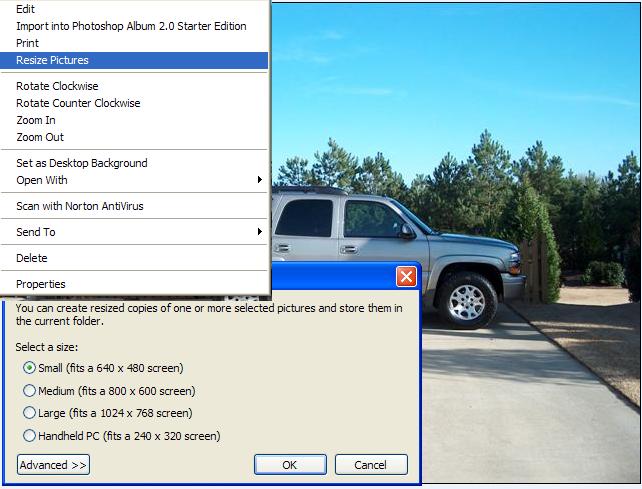
This is the easiest way that I have found to reduce picture size. *It is a quick free download from Microsoft which allows you to reduce picture size with a click of your mouse. *All you have to do once downloaded is to open the picture then right click on it. *It will open a dropdown menu where you'll see "Resize Pictures" then you can click on what size you want the picture to be. *It will then resize it and save it in the same location as the orignal with the same name but with the size added to the end (small). Best of all you don't loose any picture quality. *Follow the link below and look about half way down the page for "Image Resizer" http://www.microsoft.com/windows....ys.mspx <!--EDIT|jwcfbd Reason for Edit: None given...|1145368471 --> ______________________________________
Laguna Seca 2003 |
| |||
| Quote:
______________________________________
Dream as if you'll live forever!!!! live as if you'll *Die*today"
|
| |||
|
Can you tell it to make them all 204800 bytes? I have been trying to get mine down to that size and they are looking horrible. Resizing, cropping, reducing the MP settings on camera etc.
______________________________________
'06 Maroon/Black HMF Dual High Mount Puig Double Bubble Black Full Box Mod / BMC Filter PC III |
| ||||
|
no the only thing you can do is the size. You can select the sizes listed or make a custom size by clicking on the advanced tab. When it reduces the picture size it also reduces the file size. ______________________________________
Laguna Seca 2003 |
| ||||
| Quote:
Problem is that each picture compresses differently and would yield a different size. You could take 5 different pictures, each the same original pixel size and each would be different file sizes. Resizing them would reduce the file size, but each would still be a different filesize. Make sense? ______________________________________
'04 Blue/Silver
|
| ||||
|
Nice Tip! ______________________________________
04 LIMITED BUSA, 1397 kit, intake cam swap, 50hp wet NOS kit! 92 GSXR 1100/1216 THE BABY I JUST CANT GIVE UP 99 BUSA, SOON TO SEE THE ROAD AGAIN |
| ||||
|
that works great thanks!!!
______________________________________
2003 GREY/SILVER HAYABUSA Scorpio alarm Two Borthers slip ons TRE Cable Throttlemeister Galfer Wave Rotors Galfer stainless lines www.kloerstore.com |
| |||
| Quote:
You need to save them as/convert them to .JPG - it's a compressed format so you can get the image size down without losing quality. |
| ||||
|
cool will try it
______________________________________
2006 LE!!!!!!!!!!!!!!!! HMF Dual High Mount with polished cans and vector tips,USB PC3,BMC air filter, G3 plate Diamond Powersport bar tips,Top Gun Undertail Ducati 900SS (retired lol) |
| ||||
|
You're the man... Works great, just downloaded it to try. Too easy and perfect for creating avatars and such. Heck it works so well I might even use it at the office. SSSSSSHHHHHHHHHH, don't want anyone knowing trade secrets... Thank's again buddy ______________________________________
Honey, I'm Home... D'oh! Sarcasm, it's a form of communication for those who can't justify the time to form credible answers to questions they deem irrelevant... 04' black and purple |
| ||||
|
Irfanview is another program that works really well and is becoming more and more common for any images that are sent via email anymore. http://www.irfanview.com/ ______________________________________
moving on...
|
![]() |
| Thread Tools | |
| Display Modes | |
| |